Gaming on a Mac has never been simple. Many popular games don’t support macOS, and even those that do often require powerful graphics hardware to run smoothly. Since most Macs aren’t built with high-end gaming GPUs, playing AAA titles can feel nearly impossible.
That’s where Nvidia GeForce Now changes everything.
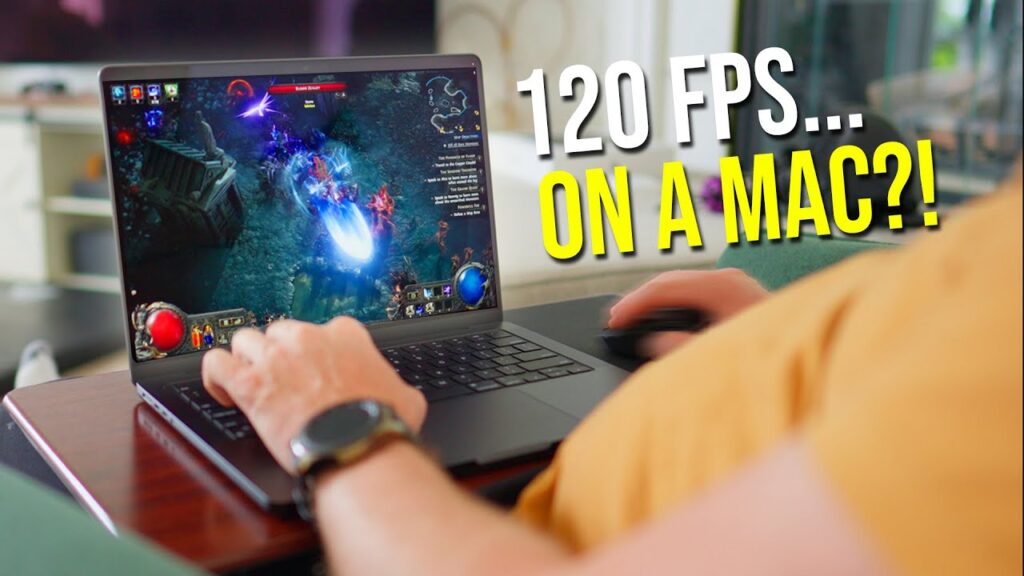
Instead of relying on your Mac’s hardware, GeForce Now runs games on powerful cloud servers and streams them directly to your device. This means you can play demanding Windows games on a Mac — without installing Windows or upgrading your hardware.
In this guide, we’ll explain what GeForce Now is, how it works on Mac, pricing options, and how to get started.
What Is GeForce Now?
GeForce Now is Nvidia’s cloud gaming platform. Rather than installing and running games locally, the game runs on a high-performance gaming PC in Nvidia’s data centers.
Here’s how it works:
- The game runs on a powerful RTX-powered cloud PC
- Video is streamed to your Mac in real time
- Your keyboard, mouse, or controller inputs are sent back to the server
In simple terms, your Mac becomes a remote screen for a powerful gaming computer.
Why GeForce Now Is Perfect for Mac Users
Macs are not traditionally designed for gaming. Many AAA titles are Windows-only, and Apple devices typically don’t include dedicated gaming GPUs.
GeForce Now solves these problems because:
- You don’t need a powerful GPU
- You don’t need to install Windows
- You can play many Windows-only games
- Your MacBook Air can run AAA games smoothly
- Cloud saves allow you to switch between Mac and PC
As long as your internet connection is stable, the experience feels surprisingly responsive with minimal lag.
Which Game Libraries Work?
GeForce Now doesn’t provide a built-in game subscription library. Instead, you connect your existing game accounts.
It currently supports major platforms such as:
- Steam
- Battle.net
You can play supported games that you already own on those platforms.
GeForce NOW innovations in 2026
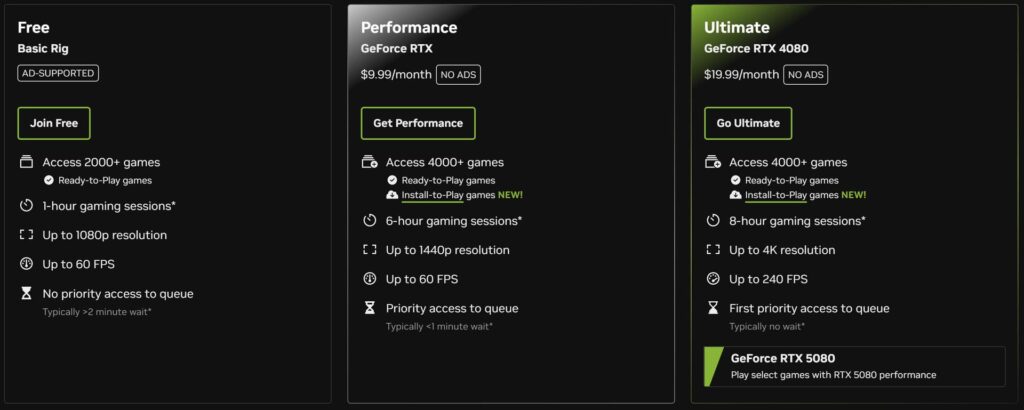
GeForce Now offers three membership tiers: Free, Performance, and Ultimate, allowing Mac users to choose the level of performance and features that best match their gaming needs.
The Free plan is designed for casual users who want to try cloud gaming without paying upfront. It provides basic access to supported games with standard queue times and session limits.
The Performance plan is the most popular option, offering improved hardware, longer session times, higher resolution support, and priority access to servers for smoother gameplay.
For players who want the best possible experience, the Ultimate plan delivers top-tier RTX-powered cloud hardware, ultra-high resolutions, higher frame rates, and first-priority server access — making it ideal for competitive gaming and maximum visual quality on Mac.
Below is a detailed comparison of the three plans so you can quickly see the differences and choose the one that fits your needs.
How to Install GeForce Now on Mac
Getting started is simple:
- Visit Nvidia’s official website and download the GeForce Now app for macOS
- Install it like any other Mac application
- Sign in with your Nvidia account
For smooth gameplay, Nvidia recommends a minimum 25 Mbps internet connection.
How to Use GeForce Now on Mac
Once installed:
- Open the GeForce Now app
- Log in to your Nvidia account
- Connect your game libraries (Steam, Battle.net, etc.)
- Choose a supported game
- Click Play
The game launches on a cloud gaming PC and streams directly to your Mac.
If the game supports cloud saves, your progress will stay synced across devices.
Frequently Asked Questions
Can you play GeForce Now on a Mac?
Do you need a powerful Mac to use GeForce Now?
Is GeForce Now free on Mac?
What internet speed is required for GeForce Now?
Can you play Steam games on GeForce Now?
Does GeForce Now support RTX and ray tracing on Mac?
Gaming on a Mac no longer has to feel limiting. With Nvidia GeForce Now, you can access high-performance, RTX-powered gaming without upgrading your hardware or installing Windows.
Because everything runs in the cloud, even lightweight devices like a MacBook Air can handle demanding AAA titles smoothly — as long as you have a stable internet connection.
Whether you choose the Free plan to test things out or upgrade to Performance or Ultimate for higher resolution and faster frame rates, GeForce Now makes gaming on macOS easier than ever.
If you’ve been avoiding gaming on your Mac due to hardware limitations, cloud gaming might finally be the solution you’ve been waiting for.