If you’re trying to create a new Telegram account or log in to an existing one, you may have encountered a frustrating message asking you to pay for SMS verification. This issue, commonly known as the Telegram SMS Fee Problem, has affected users in many countries and often appears unexpectedly during the verification process.
For years, Telegram offered free SMS verification codes for account registration and login. However, due to increasing abuse from spam accounts, automated registrations, and expensive SMS delivery costs in some regions, Telegram has introduced additional verification measures that may include SMS fees for certain phone numbers.
The good news is that paying the fee is not always necessary. In many cases, there are alternative methods you can use to receive your verification code and access your account without spending money.
In this guide, you’ll learn why the Telegram SMS Fee problem occurs and discover several proven methods to fix it.
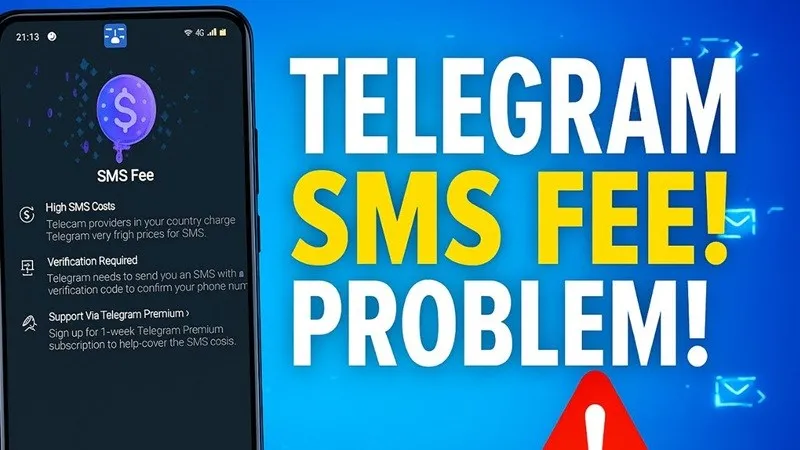
Table of Contents
What Is the Telegram SMS Fee Problem?
The Telegram SMS Fee Problem occurs when Telegram asks users to pay before receiving a verification code via SMS.
Instead of instantly sending a free verification code, Telegram may display a payment request or notify you that SMS delivery requires an additional fee.
This issue is most commonly reported when:
- Creating a brand-new Telegram account.
- Logging into Telegram on a new phone.
- Using phone numbers that have been registered multiple times.
- Using virtual or temporary phone numbers.
- Requesting too many verification codes in a short period.
Why Does Telegram Charge an SMS Fee?
Telegram has never fully explained every factor behind its SMS fee system, but several common reasons are believed to trigger it.
1. Spam Prevention
Millions of fake Telegram accounts are created every year. Charging a fee for SMS verification helps reduce automated registrations and bot abuse.
2. Expensive SMS Delivery Costs
SMS delivery is not free for Telegram. In some countries, verification messages can be significantly more expensive than in others.
3. Frequently Used Phone Numbers
If a phone number has already been used to register multiple Telegram accounts, Telegram may classify it as high risk.
4. Virtual Number Services
Many users attempt to register Telegram accounts using virtual phone numbers. Telegram actively monitors and restricts many of these services.
5. Too Many Verification Requests
Repeatedly requesting verification codes can temporarily trigger additional restrictions, including SMS fees.
How to Fix Telegram SMS Fee Problem
Try the following solutions one by one.
Method 1: Receive the Verification Code on Another Device
If you’re already logged into Telegram on another device, this is often the easiest solution.
- Open Telegram on the device where you’re already logged in.
- Start the login process on your new device.
- Wait for Telegram to send the verification code inside the app.
- Enter the code on the new device.
In many cases, Telegram will send the code through an existing session instead of SMS.
Method 2: Wait Before Trying Again
If you’ve requested multiple verification codes recently, Telegram may temporarily limit your account.
Try the following:
- Wait 6–24 hours.
- Do not request additional codes during that period.
- Try again later.
Many users report that the SMS fee prompt disappears after waiting.
Method 3: Use a Different Phone Number
If your current number consistently triggers the SMS fee message, try registering with another mobile number.
For best results:
- Use a real SIM card.
- Avoid virtual numbers.
- Use a number capable of receiving international SMS messages.
Method 4: Check Your Mobile Carrier Settings
Sometimes the problem is caused by your mobile carrier rather than Telegram itself.
Contact your carrier and confirm that:
- International SMS messages are enabled.
- Premium SMS services are not blocked.
- Telegram messages are not being filtered.
Method 5: Install an Older Version of Telegram
Some users have reported that the SMS fee prompt appeared after updating to the latest Telegram version. While this isn’t a guaranteed fix, installing an older version of Telegram may help in certain cases.
To try this method:
- Uninstall your current Telegram app.
- Download an older Telegram APK from a trusted source.
- Install the APK file on your Android device.
- Open Telegram and attempt the verification process again.
After successfully verifying your account, you can update Telegram back to the latest version through the Google Play Store if desired.
Method 6: Use Telegram’s Alternative Verification Methods
Depending on your account status and location, Telegram may offer alternative verification methods such as:
- In-app verification.
- Call verification.
- Existing device verification.
- Premium verification options.
Always check all available verification options before paying any SMS fee.
How to Avoid the Telegram SMS Fee Problem in the Future
While you can’t completely control Telegram’s verification system, you can reduce the chances of encountering the problem again.
- Avoid creating multiple Telegram accounts using the same number.
- Don’t repeatedly request verification codes.
- Use a genuine mobile number.
- Keep Telegram updated.
- Maintain at least one active Telegram session.
- Enable two-step verification for extra security.
Final Thoughts
The Telegram SMS Fee Problem can be frustrating, especially when you’re trying to access an important account. Fortunately, the issue is often temporary and can usually be resolved without paying.
Before spending money, try receiving the code through another Telegram session, waiting a few hours, updating the app, or using a different phone number.
In most situations, one of these methods will help you successfully receive your verification code and regain access to Telegram.
Frequently Asked Questions
No. If the payment request appears inside the official Telegram app, it is part of Telegram’s verification system and not a scam.
Telegram uses various factors including your country, mobile carrier, phone number history, and account activity when deciding which verification method to provide.
There is no guaranteed bypass. However, receiving the verification code on another logged-in Telegram device or waiting before requesting another code often resolves the issue.
No. Using legitimate verification methods provided by Telegram will not result in an account ban.
If you urgently need access and Telegram offers no alternative verification options, paying the fee may be the quickest solution. However, it is recommended to try the free methods in this guide first.