ZENHub GFX is a free Android utility designed for Mobile Legends: Bang Bang players who want to customize their favorite heroes with different skins, backgrounds, and battle emotes. Developed by Zendevour, the app also includes a simple injector for applying supported skins and other customization items.
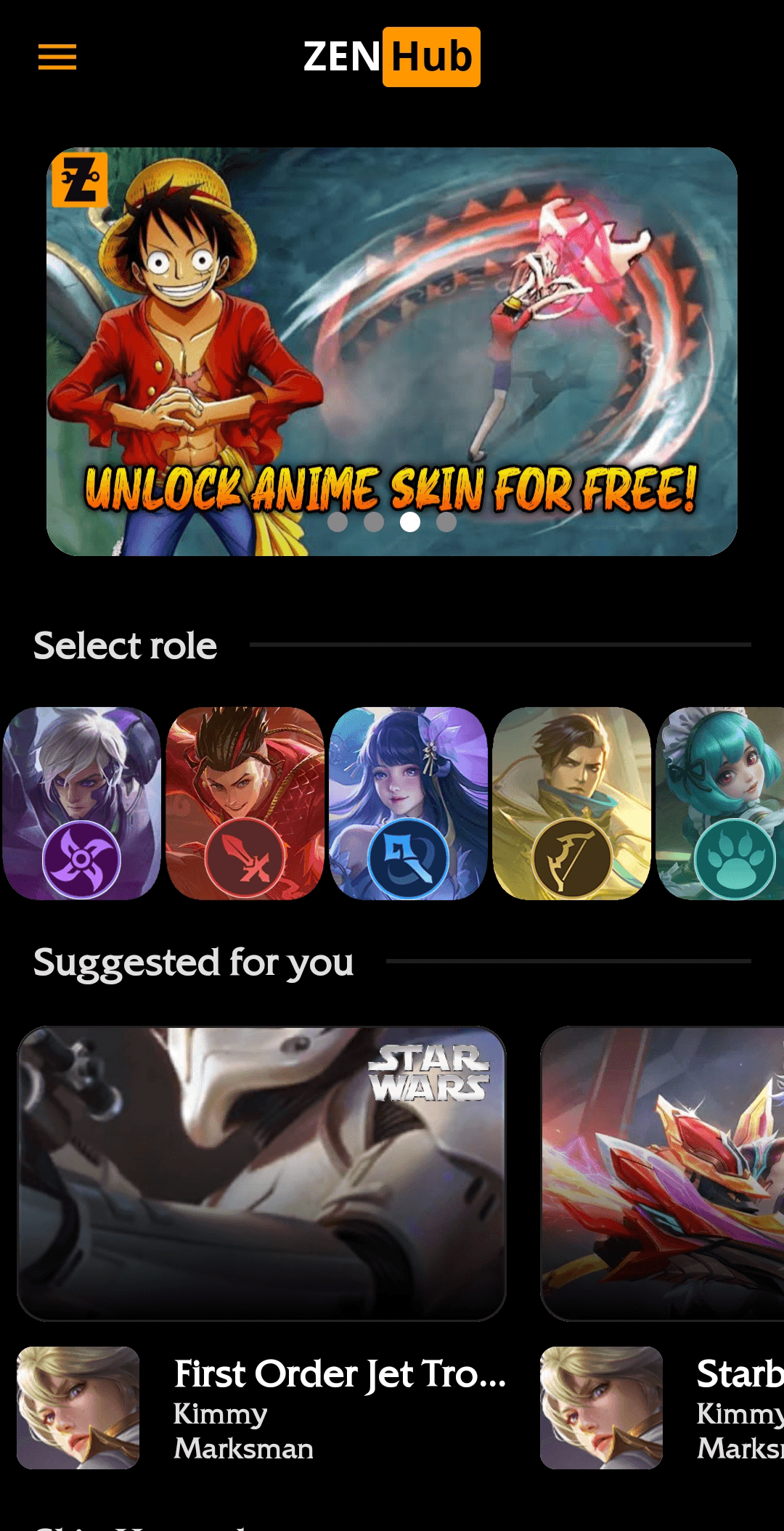
In this guide, we’ll take a closer look at ZENHub GFX, its main features, app requirements, and how to download and install the APK on your Android device.
1 What Is ZENHub GFX?
ZENHub GFX is a free game utility developed by Zendevour for players of Mobile Legends: Bang Bang. The app focuses on hero customization, offering a collection of skins, backgrounds, and battle emotes in one place.
According to its Softonic listing, ZENHub GFX provides a diverse selection of skins for almost all selectable characters on the live server. This includes popular heroes such as Lancelot and Bruno.
Many of the available skins can also include ability effects and voice-overs. The application also features a simple injector that allows supported skins and other items to be applied with a few taps.
2 Main Features of ZENHub GFX
- ZENHub GFX offers a wide selection of skins for Mobile Legends heroes. The app is designed to let players browse different customization options for many selectable characters.
- Some skins available through the app include additional ability effects and voice-overs, giving supported heroes a more customized presentation during gameplay.
- In addition to hero skins, ZENHub GFX includes different backgrounds that players can use as part of their customization options.
- The application also provides battle emotes, allowing players to add another layer of customization to their Mobile Legends experience.
- One of the main features of ZENHub GFX is its built-in injector. According to Softonic, the injector allows users to apply supported skins and other items with a few taps.
Softonic lists disruptive pop-up advertisements as one of the drawbacks of ZENHub GFX, so you may encounter ads while using the application.
3 What You’ll Need
| Requirement | Details |
|---|---|
| Device | Android phone or tablet |
| Developer | Zendevour |
| Version | 2.6.1 |
| Android | Android 15.0 listed by Softonic |
| Language | English |
| License | Free |
| File Size | 20.97 MB |
| File Format | XAPK |
The current Softonic listing shows version 2.6.1, with a latest update date of January 29, 2026. The listed file size is approximately 20.97 MB, and the package filename is com.zenhub.gfx_2.6.1.xapk. :contentReference[oaicite:3]{index=3}
The current Softonic listing identifies the ZENHub GFX package as an XAPK file. XAPK files may require a compatible installer rather than being opened directly through the standard Android package installer.
- Download ZENHub GFX 2.6.1 APK for Android click here.
- Once the download is complete, open your Android file manager and locate the downloaded file.
The current Softonic listing uses the filename
com.zenhub.gfx_2.6.1.xapk.
If Android cannot open the file directly, use a compatible XAPK installer.
- Open your Android file manager and find the downloaded ZENHub GFX XAPK file.
- If your device cannot open the XAPK directly, use a compatible XAPK installer.
- Follow the on-screen instructions provided by the installer.
- If Android asks for permission to install apps from an unknown source, open the related settings.
- Enable Allow from this source for the browser or file manager you are using.
- Return to the installation screen and tap Install.
- Wait for the installation process to finish.
If Android prevents the installation, check the Install unknown apps permission for the application you used to open the downloaded package, then try again.
- Once the installation is complete, open ZENHub GFX from your Android app drawer.
- Allow any permissions that are required for the application to function.
- Browse the available Mobile Legends skins inside the app.
- Select a supported hero and explore the available customization options.
- You can also browse the available backgrounds and battle emotes.
- If supported, use the built-in injector to apply the selected customization.
ZENHub GFX is a third-party utility for Mobile Legends: Bang Bang. It is not presented as an official Mobile Legends feature, so use it at your own discretion and follow the game’s rules.
4 Extra Tips and Important Information
- Check the version: Make sure you’re downloading the version you intend to use. The current Softonic listing shows version 2.6.1.
-
XAPK installation:
The listed package uses the
.xapkformat, which may require a compatible installer. - Storage: Make sure your Android device has enough free storage before starting the installation.
- Permissions: Review the permissions requested by the application before granting access.
- Advertisements: Pop-up advertisements may appear while using the application.
- Security: Softonic currently reports the listed file as having passed its security scan using VirusTotal technology. However, Softonic also explains that its permission report is informational and is not a substitute for a complete security or privacy audit.
Softonic’s current permission report lists permissions including
WAKE_LOCK,
FOREGROUND_SERVICE,
ACCESS_NETWORK_STATE,
READ_EXTERNAL_STORAGE,
INTERNET,
WRITE_EXTERNAL_STORAGE,
and
POST_NOTIFICATIONS.
The report is generated from package metadata and does not by itself
establish that personal information is collected or transmitted.
5 Frequently Asked Questions
com.zenhub.gfx_2.6.1.xapk, so an XAPK-compatible installer may be required.
6 Conclusion
Here’s a quick recap of ZENHub GFX for Android:
- Free utility: ZENHub GFX is listed as a free Android application.
- Mobile Legends customization: The app provides skins, backgrounds, and battle emotes.
- Built-in injector: Supported skins and other items can be applied through the included injector.
- Latest listed version: Version 2.6.1 with a file size of approximately 20.97 MB.
-
XAPK package:
The listed package uses the
.xapkfile format. - Potential drawback: Pop-up advertisements may interrupt the experience.
If you’re looking for a customization utility for Mobile Legends on Android, ZENHub GFX brings skins, backgrounds, battle emotes, and an injector together in one application. Just make sure to download from a trusted source, check the file format, and review the requested permissions before installing.
🎮 Ready to Try ZENHub GFX?
Download the latest listed version and explore skins, backgrounds, and battle emotes for Mobile Legends.