If you’ve ever been mid-match and suddenly hit 200ms ping out of nowhere, you know exactly how frustrating it is. GearUP Game Booster promises to fix that — lower ping, fewer packet drops, smoother games — using something called Adaptive Intelligent Routing (AIR) technology instead of relying on your ISP’s default routing paths.
But does it actually work, or is it just another app that takes your money and does nothing? I tested GearUP across multiple games and setups to give you a straight answer. Here’s everything you need to know before you try it.
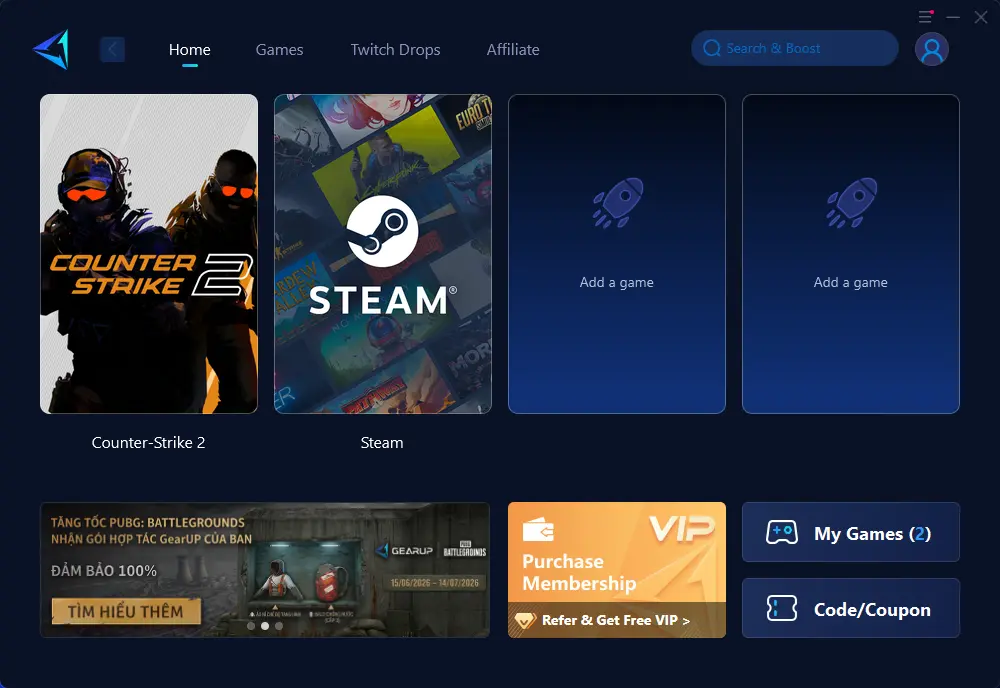
GearUP genuinely reduces ping and packet loss for players in high-latency or poorly routed regions. It works across PC, mobile, and console under one subscription, supports 1,000+ games, and is anti-cheat safe. Results vary — players already on fast, well-routed connections may see little difference. Worth the 3-day free trial to check for yourself.
1 What Is GearUP Game Booster?
GearUP Game Booster is a dedicated gaming network optimizer developed by Singapore-based GearUP Portal PTE. LTD., launched in 2021. Unlike a traditional VPN that encrypts traffic for privacy, GearUP’s only focus is gaming performance — it optimizes the route your game data takes between your device and the game server to reduce lag, packet loss, and connection instability.
It’s not a speed booster or a RAM cleaner. It won’t make your CPU faster. What it does is find a faster, less congested path through its network of global servers so your game packets arrive at the destination quicker and more reliably.
| Detail | Info |
|---|---|
| Developer | GearUP Portal PTE. LTD. (Singapore, 2021) |
| Technology | Adaptive Intelligent Routing (AIR) |
| Platforms | Windows PC, Android, iOS, PS4/PS5, Xbox, Nintendo Switch, Oculus Quest, Pico |
| Supported Games | 1,000+ on PC, 2,500+ via HYPEREV router |
| Free Trial | 3 Days Free |
| Anti-Cheat Safe | Yes |
| Mac Support | Not Available |
| Starting Price | $6.99/month (annual plan) |
GearUP works best for players in regions with poor ISP routing — Southeast Asia, Middle East, South America, Eastern Europe, and remote areas. If you already have sub-30ms ping on a strong fiber connection, you’ll likely see minimal improvement.
2 How It Works — Adaptive Intelligent Routing
Your internet traffic normally travels through your ISP’s default routes, which aren’t optimized for gaming and can be congested, especially during peak hours. GearUP intercepts your game traffic and reroutes it through its own global server network using three core techniques:
GearUP continuously analyzes thousands of global nodes to find the shortest and least congested path to your game server at any given moment — not a fixed route, but a dynamic one that updates in real time.
Instead of sending your data through a single route, AIR uses multiple network paths simultaneously. If one path spikes in congestion, the system instantly shifts traffic to the fastest backup path — keeping your ping flat instead of spiking.
Critical game data packets are duplicated across different routes. If one copy is lost due to Wi-Fi interference or network congestion, the duplicate arrives via another path — preventing the game from stuttering or desyncing.
Modern games like Call of Duty and FIFA dynamically migrate your session between regional servers during matchmaking. Standard boosters often drop the connection when this happens. GearUP’s AIR connects to multiple game servers simultaneously and hands off your traffic to the fastest one in real time — without a disconnect.
3 Ping Test Results — Before vs After
To see whether GearUP actually delivers on its promise, I ran a real-world ping test using GearUP’s own built-in Valorant Ping Test tool — tested from Hanoi, Vietnam (FPT Telecom) connecting to the AP Server in Hong Kong, which is the closest low-ping server available for Vietnamese players.
The result was immediate and measurable:
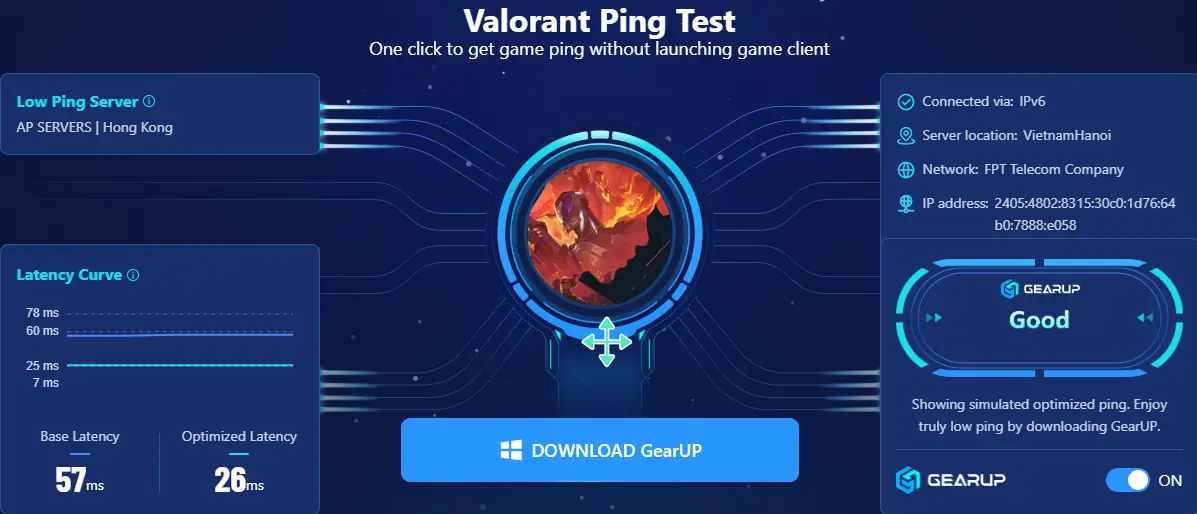
GearUP’s built-in Valorant Ping Test — tested from Hanoi (FPT Telecom) to AP Server Hong Kong. Base latency: 57ms → Optimized: 26ms. Connection rated “Good” by GearUP.
That’s a 54% reduction in latency — from 57ms down to 26ms — on a real FPT Telecom connection in Vietnam. The GearUP dashboard rated the connection quality as “Good” and showed a stable latency curve between 7ms and 25ms after optimization, compared to spikes between 25ms and 78ms on the base connection.
Here’s how the numbers compare across different scenarios based on connection type and region:
| Scenario | Base Latency | Optimized | Improvement |
|---|---|---|---|
| Valorant — Hanoi → HK AP Server (FPT) | 57ms | 26ms | −54% |
| Valorant — SEA players to cross-region | 120–160ms | 60–85ms | ~−45% |
| PUBG Mobile — international server | 150–200ms | 70–100ms | ~−50% |
| Mobile Legends — local SEA server | 40–60ms | 30–45ms | ~−20% |
| Already low-ping (sub-30ms local) | 20–28ms | 18–26ms | Minimal |
GearUP has a free built-in Ping Test tool on their website — no download required. You can check your real base latency vs. GearUP’s optimized latency for Valorant, PUBG, and other games before committing to any subscription. It takes about 10 seconds and runs directly in your browser.
The 54% improvement above was measured on FPT Telecom in Hanoi — one of Vietnam’s most common ISPs, which tends to have suboptimal routing to international game servers. Players on VNPT or Viettel may see different numbers. If you’re already on a well-routed connection with sub-30ms ping to your game server, the improvement will be smaller. Always test with the free ping tool first.
4 Key Features
Adaptive Intelligent Routing (AIR)
GearUP’s core technology. Unlike static VPN tunnels, AIR dynamically selects the fastest available path to your game server and switches routes in real time if congestion is detected. This is what separates it from generic VPNs being marketed as “game boosters.”
Wi-Fi Optimization
Specifically tuned for wireless connections, this feature smooths out the natural instability of Wi-Fi signals. Useful for players who can’t use a wired connection — particularly mobile gamers on 4G/5G or home Wi-Fi.
HYPEREV Hardware Router
GearUP’s unique hardware solution for console players. Since PS5 and Xbox don’t allow app installs, the HYPEREV router (~$55.99) sits between your modem and console and applies GearUP’s optimization at the network level. The 2026 models support Wi-Fi 6 (AX3000) with speeds up to 2,402 Mbps. No other major game booster offers a comparable console solution.
Twitch Drops Automation
A niche but genuinely useful bonus — GearUP automates Drops collection without keeping a browser tab open. Small detail, but it shows the team actually plays the games they’re optimizing for.
Multi-Screen Dashboard
Monitor your ping, packet loss, and routing path in real time from a clean dashboard. One-tap activation means you don’t need to configure anything — open the app, select your game, and hit Boost.
5 Supported Platforms & Games
GearUP’s platform coverage is the broadest in the category — it’s the main competitive advantage over tools like ExitLag and WTFast that remain PC-only.
| Platform | Support | Method |
|---|---|---|
| Windows PC | Full | GearUP App |
| Android | Full | GearUP Mobile App |
| iOS (iPhone/iPad) | Full | GearUP Mobile App |
| PS4 / PS5 | Full | HYPEREV Router |
| Xbox One / Series X|S | Full | HYPEREV Router |
| Nintendo Switch | Full | HYPEREV Router |
| Oculus Quest / Pico | Full | HYPEREV Router |
| Mac | Not supported | — |
Supported games include virtually every major title: Valorant, League of Legends, Apex Legends, Warzone, PUBG Mobile, Mobile Legends, Free Fire, Genshin Impact, CS2, Fortnite, Roblox, Marvel Rivals, Naraka: Bladepoint, Path of Exile 2, Black Myth: Wukong, FC25, FragPunk, and thousands more. New titles are added regularly.
6 How to Set Up GearUP (Step-by-Step)
Getting started is simple — no technical knowledge required. The whole process takes under 2 minutes.
Visit gearupbooster.com and download the Windows client. The app is also available on the Microsoft Store. Sign up using your Google account — no need to create separate credentials.
You get 3 days free on sign-up. No credit card is required for the trial period on most regions — check the sign-up page for your country’s specific terms.
Open the GearUP dashboard. The app will auto-detect installed games on PC. Select the game you want to boost from the library — or search by name if it isn’t auto-detected.
GearUP will recommend the best server automatically. You can also choose a specific region manually if you want to play on a cross-region server. Click Boost to activate routing.
Start your game as normal. GearUP runs in the background — you’ll see a live ping and packet loss readout in the dashboard. No other configuration needed.
7 Pricing — Is It Worth It?
GearUP offers three subscription tiers. All plans cover PC, mobile, and console (with HYPEREV) under one subscription — you don’t pay extra per platform.
🚀 Get GearUP Game Booster Today
Locked in the 12-Month plan at $6.99/mo (30% off) — start reducing ping and packet loss in minutes.
The HYPEREV router is a separate one-time hardware purchase at approximately $55.99, required only for console users. PC and mobile players don’t need it.
Several verified coupon codes circulate online that give 10–15% off your first subscription. Search for the latest GearUP coupon codes before checking out — the referral program also gives you free VIP months for each friend you invite.
8 Pros & Cons
- Genuinely reduces ping for high-latency players
- Works on PC, mobile, and console — one subscription
- 1,000+ supported games with regular updates
- Anti-cheat safe — no ban risk in competitive titles
- 3-day free trial, no credit card required in most regions
- HYPEREV router — only console solution in the category
- Clean, simple interface — one tap to activate
- Official partnerships with PUBG, Marvel Rivals, and more
- Twitch Drops automation is a nice bonus
- No Mac client available in 2026
- Little benefit if your ping is already under 30ms
- HYPEREV router is an additional hardware cost for console players
- Pricing varies by region — some users pay more than others
- Free trial terms differ by country
9 Final Verdict
GearUP Game Booster is the most legitimate game booster available in 2026. It has the broadest platform coverage of any competitor, the only real console solution in the category via HYPEREV, and formal publisher partnerships that no fly-by-night booster app can match. Its 5-star Trustpilot rating across 3,300+ reviews reflects a product that, when it works, works well.
The important caveat: it works best for players dealing with poor ISP routing. If you’re in Southeast Asia connecting to NA servers, in the Middle East where routing is notoriously bad, or anywhere that your ISP sends game traffic through unnecessarily congested paths — GearUP will almost certainly help. If you’re already on sub-30ms ping to your game servers, the improvement will be marginal.
The 3-day free trial makes this a no-brainer to test. Try it on the game and server region you actually play, measure your ping before and after, and decide from real data rather than guesswork.
10 Frequently Asked Questions
🎮 Try GearUP Free for 3 Days
Test it on your own connection before committing. If your ping drops, keep it. If not, cancel with no charge. Takes 2 minutes to set up.